
Main Menu
The main menu appears when the user clicks the menu button in the Web Report Designer’s upper-left corner.
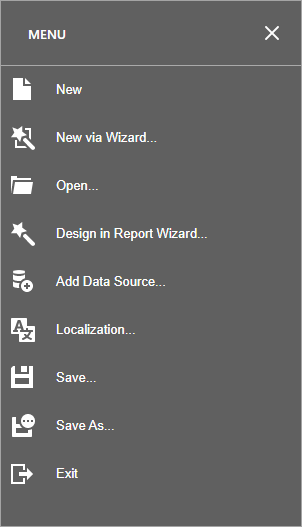
The menu contains the following commands:
| Command | Icon | Description |
|---|---|---|
| New |  | Creates a report and opens it in a new tab. This command is available if the report storage service is registered in the application. |
| New via Wizard |  | Invokes the Report Wizard to create a new report. This command is available if the report storage service is registered in the application. |
| Open |  | Invokes the Open Report dialog to retrieve a report from the server-side report storage and open it in a new tab. This command is available if the report storage service is registered in the application. |
| Design in Report Wizard |  | Invokes the Report Wizard to edit the current report and generate the report layout. |
| Add Data Source |  | Invokes the Data Source Wizard to create a new data source and configure it. This command is available when the Report Designer has registered data connections. |
| Localization |  | Invokes the Localization Editor. |
| Save |  | Saves the current report to the report storage. |
| Save As |  | Invokes the Save Report dialog to save the current report to the report storage under a new URL. This command is available if the report storage service is registered in the application. |
| Exit |  | Closes the Web Report Designer. |
Handle the following client-side events to customize the Main Menu:
| ASP.NET Web Forms & MVC | ASP.NET Core |
|---|---|
CustomizeMenuActions | CustomizeMenuActions |
Updated 7 months ago