
Getting Started with Compyl
Welcome to Compyl's Knowledge Center!
Whether you're a seasoned veteran within the Compyl platform or just learning it for the first time, you have come to the right place. This guide is designed to give you an overview of how Compyl is structured and where to find all those insights that will help you improve your day to day security activity quickly.
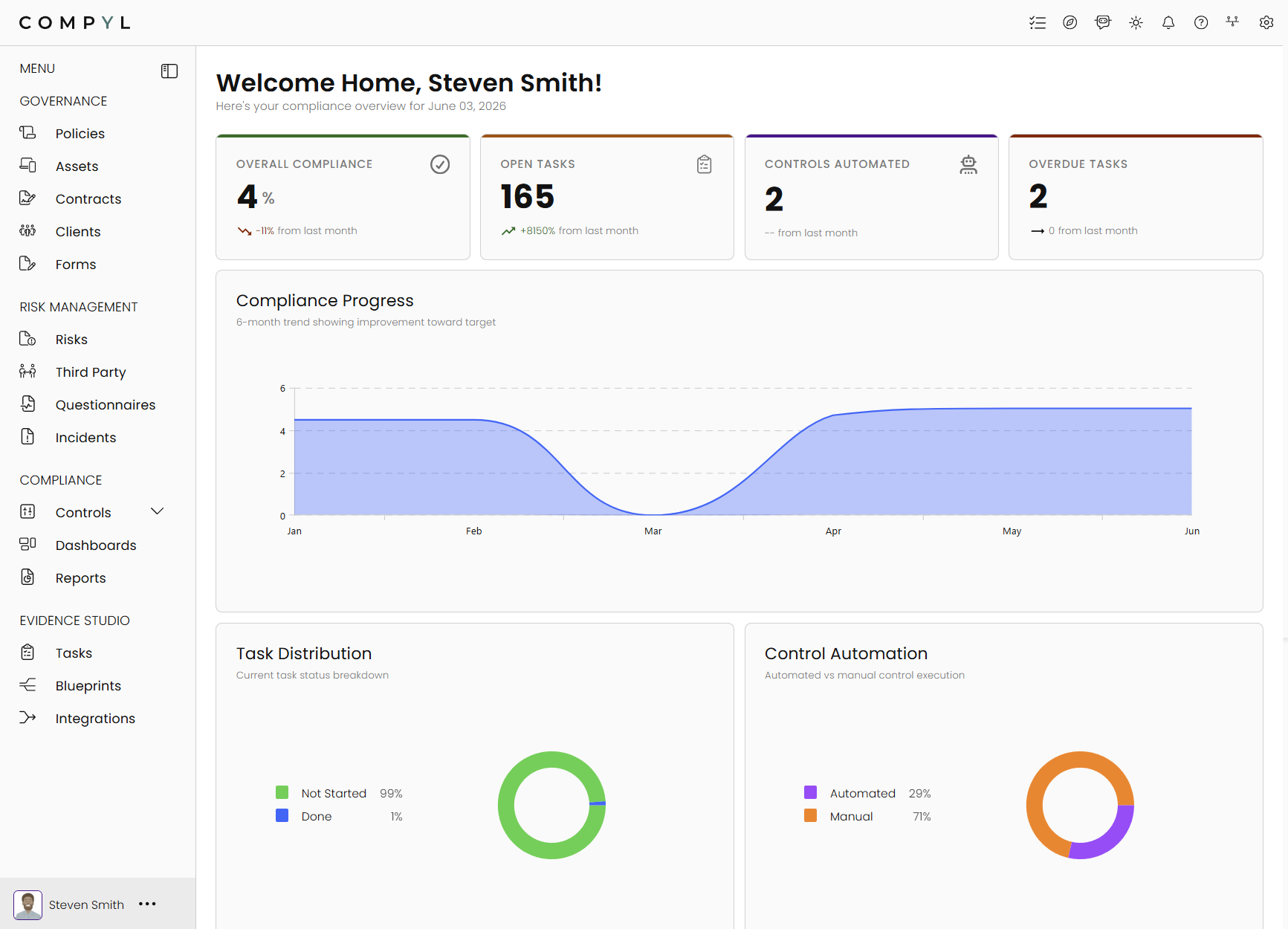
When you first open Compyl, you're presented with the main dashboard. The dashboard gives you quick insights into what is happening and where. To your left, you have your navigation and we will be breaking down these further below.
Whenever you need to learn more, just have a look at the left hand side for a corresponding learning item or search for the outcome you wish to achieve.
Each function of Compyl (and there are many) fall within 4 categories on the navigation bar. Governance, Risk Management, and Compliance or GRC. There is an additional heading for our Evidence Studio which covers gaining insight into the ingested data and manipulate the data in the platform to present your current GRC and security posture.
💬 Governance
Governance encompasses the core components of the tool. Things like policies and environment registers live here.
-
Policies - Build policies from a template or manage policy update schedules. This is where your policies are stored and managed
-
Assets - Used to store all of your assets, whether they be logical or physical. These assets can be linked to vendors, contracts, clients, people, policies, risks or anything else in Compyl.
-
Contracts - Manage all your contracts in one place. Have owners and expiry dates available for both identification of cost improvement opportunity as well as the capacity to raise risks and assign vendors to each contract.
-
Clients - centralizes all of your Clients enabling you to easily view, manage, and track the implementation status of each client.
-
Audits - Compyl allows for quick and easy management of audit requirements, data collection and artefact retention for audits.
-
Forms - Allow you to create and collect data using custom forms. This is particularly useful during vendor risk assessments and data collection activities that require unform information to be collected from a diverse user base.
Compyl is built to learn in bite sized chunks. Start with the essentials and learn as your company grows.
🚦 Risk Management
Uniform risk management is very much a unicorn for many companies. It really doesn't have to be. Compyl has been designed to create an environment that fosters uniformity and consistency in all its processes.
- Risks - A centralized repository for all of your risks, registered and linked across your vendors, assets, policies, contracts, clients, audits, departments and incidents.
- Third Party - A centralized repository for your vendors, their risk footprint, tests against your vendor's security posture etc.
- The Questionnaire tool enables you to create and complete various questionnaires for your security program. For example, run a Gap Questionnaire based on a security regulation or framework, send a vendor questionnaire for security due diligence, or build an internal systems assessment for a more in-depth look at your organization's environment.
- The Incidents section of the Compyl platform is designed to provide a secure and efficient way to log, manage, and track incidents. This feature ensures that all incidents are recorded in a secure environment, facilitating swift and effective responses to any security issues.
Risk management is the foundation of any great security and compliance program.
📈 Compliance
One of the best ways to know if you're nailing the dev experience is checking out how your users are interacting with both your docs and API.
- The Controls page provides a detailed view of all frameworks and regulations being tracked in Compyl. Search, view, and track the progress and requirements of all the frameworks and controls.
- Compyl Dashboards is a powerful toolkit for building dynamic, user-friendly applications that unify data from multiple sources into interactive visualizations like tables, charts, and gauges, enabling teams to track KPIs and make data-driven decisions with confidence.
- The Reports section of the tool allows you to build you own bespoke custom reports. These are not just basic CSV reports or plain jane PDFs either. The report designer allows for full customization and creation of in-depth, low level, conditional based controls reports that will impress even the fussiest of CISOs.
Compliance is the responsibility of everyone within an organization. Compyl aims to have everyone talking about compliance and risk, enabling the conversation of responsibility and risk mitigation.
Evidence Studio
- Tasks are used in Compyl as a means to provide a record and evidence of the task being completed within the central location of the compliance program in Compyl. Tasks track compliance and security activities such as evidence collection, configuration checks, user access reviews, risk and vendor reviews, etc. Compyl's task board provides a centralizes view of all security tasks as well as their status and owner.
- The Evidence Studio is the driver behind pulling integration data in Compyl, presenting it based on how the data has been queried, and putting tasks/workflows overtop of the data as part of your compliance program. It can also be used to run reports and workflows related to data native in Compyl, such as Risks and IT Assets. Once a query is created, it is then attached to a task, and the data is presented to the owner(s) at the specific dates and frequency.
- Integrations allow Compyl to interact with your current environment, running queries against users, security controls and priorities within that environment and others. If you have a use case for the data to be consolidated and manipulated, chances are, it can be done natively in Compyl. New integrations are being developed daily.
We're excited you're here! 💙 If you have any further questions or need further assistance beyond what is located in this documentation, please feel free to contact our customer success team through your regular meeting cadence or support ticket. We aim to make your Compyl experience a positively life changing one.
If you are looking for the customer portal and your ticket list, look no further!
Updated 8 days ago